
 English
 French

OAuth 2.0 Web Engine API Documentation
This documentation explains how to register, configure, and develop your app so you can successfully use our APIs
01 App Registration Pipeline
In order for your app to access our APIs, you must register your app using the App Dashboard. Registration creates an App ID that lets us know who you are, helps us distinguish your app from other apps.
02 Social Login OAuth Pipeline
Log in With system is a fast and convenient way for people to create accounts and log into your app. Our Log in With system enables two scenarios, authentication and asking for permissions to access people's data. You can use Login With system simply for authentication or for both authentication and data access.
Redirect the visitor's runtime browser sequence connection towards our unified authorization gateway screen loop:
<a href="https://9jawap.net/api/oauth?app_id=YOUR_APP_ID">Log in With 9jawap – Nigerian Social Media & Community App</a>
🎨 Gateway UI Prompt Preview Reference Screen Panel Layout Presentation:
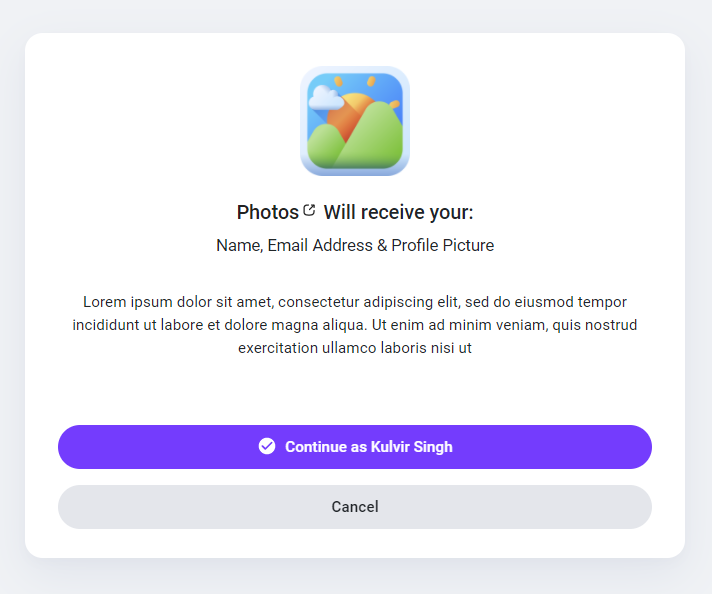
Upon access confirmation verification approval, our system returns a temporal exchange session token parameter vector value via GET routing parameters targeting your declared Redirect URL link setup:
https://mydomain.com/my_redirect_url.php?auth_key=AUTH_KEY
03 Access Token Exchange Script Execution
Once you get the user approval of your app Log in With window and returned with the auth_key which means that now you are ready to retrive data from our APIs and to start this process you will need to authorize your app and get the access_token and you can follow our steps to learn how to get it.
Execute a background secure cURL POST connection sequence loop query parameter request targeting our authorization router endpoint module block:
<?php
$app_id = "YOUR_APP_ID";               // Your secure application runtime identity key ID profile code reference identifier parameters block
$app_secret = "YOUR_APP_SECRET";       // Your confidential application cryptographic signature certificate key access phrase
$auth_key = $_GET['auth_key'];         // The temporary incoming exchange verification reference identifier parsed from the active validation redirect loop sequence link data profile payload parameters mapping tracker code node context asset block matrix segment

$postData = [
  'app_id' => $app_id,
  'app_secret' => $app_secret,
  'auth_key' => $auth_key
];

$ch = curl_init('https://9jawap.net/api/authorize');
curl_setopt($ch, CURLOPT_RETURNTRANSFER, true);
curl_setopt($ch, CURLOPT_POST, true);
curl_setopt($ch, CURLOPT_POSTFIELDS, http_build_query($postData));

$response = curl_exec($ch);
if (curl_errno($ch)) {
  die('cURL error: ' . curl_error($ch));
}
curl_close($ch);

$json = json_decode($response, true);
if (!empty($json['access_token'])) {
  $access_token = $json['access_token']; // Your live authenticated data query access permit token
}
?>
04 Data Fetching Queries Graph Core Modules Reference Directory Map Data Endpoint Node Profile
Once you get your access_token Now you can retrieve informations from our system via HTTP GET requests which supports the following parameters
🛠️ Query Execution Paradigm Framework Application Implementation Code Layout Configuration Sample Blueprint Example:
if(!empty($json['access_token'])) {
   $access_token = $json['access_token'];
   $get = file_get_contents("https://9jawap.net/api/get_user_info?access_token=$access_token");
}
📦 JSON Struct Object Stream Response Payload Tree Map Scheme Configuration Blueprint Structural Output Layout Sample Context Target:
{
    "user_info": {
        "user_id": "1024",
        "user_name": "developer_vanguard",
        "user_email": "[email protected]",
        "user_firstname": "Vanguard",
        "user_lastname": "Elite",
        "user_gender": "male",
        "user_birthdate": "1996-04-12",
        "user_picture": "https://9jawap.net/uploads/photos/thumbnail_avatar.png",
        "user_cover": "https://9jawap.net/uploads/photos/header_banner_plane.jpg",
        "user_registered": "2026-06-04 00:00:00",
        "user_verified": "1",
        "user_relationship": "single",
        "user_biography": "Elite developer node building decentralization channels on Sngine modules layout.",
        "user_website": "https://9jawap.net"
    }
}